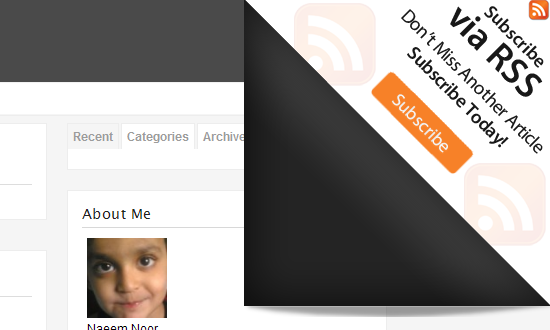
Hello, in this post i’m gonna show you how to implement the page peel effect for blogger. This was origianlly done by Sohtanaka.
How to Use
Simply copy all of the code on this page to your clipboard (you can do this easily using the keyboard shortcuts CTRL+A followed by CTRL+C).
Next, locate this line in your blog template:
</head>
Paste the code from your clipboard directly before this line.
Now add the following code just after<body>
<div id='pageflip'>

<a href='http://feeds.feedburner.com/naeemnur'><img alt='' src='http://www.wallheaven.com/page_flip.png'/></a>

<div class='msg_block'></div>

</div>
This is the first time m seeing such a trick, thanks man 😀
This is very useful for blogger users. Can add a non-intrusive advert or rss subscriber invitation.
not working at all
hi frnd ! thanks for ur works – frnd this simple page feel effect is not working properly can u please help me out in this — urgent- though i am using the same template – error is coming like this —-
Your template could not be parsed as it is not well-formed. Please make sure all XML elements are closed properly.
XML error message: Open quote is expected for attribute “{1}” associated with an element type “type”.
please see this – waiting for ur reply!
Updated the post, now it should work!
help me frnd!
frnd – i have added your template for my site- checkdiabetes.org and check it and in right side the recent ,categories and labels the letters are Grey in color and they are looking dull can u please tell me how can i change that color to some blue color which is on my post titles .
I also faced one major problem , that when page is loading if i preass recent or categories or archives then they are dissapearing and for ex : cat# is showing after the url concerned- please help me in this troubles frnd- sorry for my bad english-
regards
rajesh moagnti
Nice Blog
.-= aBlogz´s last blog ..WordPress Themes : ePhoto Themes – ElegantThemes Premium WordPress Theme =-.
Thanks BRO !
I have added this trick to my site site and its working.
Izhar Fareed
http://www.circuit-lab.com
http://www.extremecircuit.blogspot.com
Hi , the stuff you have given is good
but can you tell me the procedure after coping to a clip board, I did not understand properly.
Hey dude.. great post.. thanks
This is Amazing… Thanks men & Visit my blog!
😀 nice blog!
Thank you,
very interesting article
Hi there, i tried on a phpbb 3 forum system, but it won’t peel down !!! how can i fix it?
Wow loved reading this blogpost. I added your feed to my blogreader.
Thanks a lot
I have added this snippet to my site site and its working.
Simjith
.-= Simjith´s last blog ..Hide Unread Email Messages Notification on XP Logon Welcome Screen =-.
Thanks you so much! Your blog too!
.-= John!´s last blog ..Traduce tu blog con el Widget de Bing =-.
Thanks a lot for great Plugin!
it works!
Thank you very much for the tutorial, works great! It might be worth mentioning that that RSS feed url has to be replaced, else everyone gets redirected to your blog 😉 Also, if you are using blogger you will have a 15px blogger navigation bar on top.
If you want the animation to start below, you have to indicate that in the code. Furthermore, I had to change an attribute to “absolute”. It works fine with me now, I copied that part of the code below in case anyone needs it:
#pageflip {
position: absolute;
right: 0; top: 15px;
float: right;
}
#pageflip img {
width: 50px; height: 52px;
z-index: 99;
position: absolute;
right: 0; top: 15px;
-ms-interpolation-mode: bicubic;
}
#pageflip .msg_block {
width: 50px; height: 50px;
overflow: hidden;
position: absolute;
right: 0; top: 15px;
background: url(http://www.wallheaven.com/subscribe.png) no-repeat right top;
Hi Bro,
It is not working for me.I used IE8 and the code is given below.Please advice what is wrong?
Untitled Page
img { behavior: url(iepngfix.htc) }
#pageflip {
position: absolute;
right: 0; top: 15px;
float: right;
}
#pageflip img {
width: 50px; height: 52px;
z-index: 99;
position: absolute;
right: 0; top: 15px;
-ms-interpolation-mode: bicubic;
}
#pageflip .msg_block {
width: 50px; height: 50px;
overflow: hidden;
position: absolute;
right: 0; top: 15px;
background: url(image/subscribe.png) no-repeat right top;
}
$(document).ready(function(){
//Page Flip on hover
$("#pageflip").hover(function() {
$("#pageflip img , .msg_block").stop()
.animate({
width: '307px',
height: '319px'
}, 500);
} , function() {
$("#pageflip img").stop()
.animate({
width: '50px',
height: '52px'
}, 220);
$(".msg_block").stop()
.animate({
width: '50px',
height: '50px'
}, 200);
});
});
Great post.. thanks
Hi,your demo is not working properly.I closed browser and checked again still same issues.I want to implement this to my new bloggers blog.Can you please HELP
Thank you very much!
There are some issues on my site but the code itself is great! 🙂
Thx alot on your intelligence to make things interesting in the blog template design
this is not an image link!
http://www.wallheaven.com/page_flip.png
the wallheaven.com is opening when clicking on this link
http://indiarockz.co.cc